How to Hire Your First AI Agent: Beginner Guide 2026
· Nitish Kumar · 20 min
- AI agents are autonomous teammates, not just tools — unlike traditional automation that follows fixed rules, AI agents can reason, adapt, and make independent decisions to complete complex workflows.
- Start with ready-made solutions over custom builds — platforms like Deskferry offer no-code deployment of AI teammates, eliminating the need for expensive developers or technical expertise.
- Focus on high-impact use cases first — customer support, marketing automation, and operations see the biggest productivity gains, with companies reporting up to 30% cost savings and 122 hours saved annually per employee.
- Proper team training is critical for success — 99.5% of organizations invest in AI literacy training to help employees view AI as augmentation rather than replacement, ensuring smooth integration.
- ROI calculation is straightforward — use this formula: (Hours saved per month × Hourly rate) - Monthly subscription cost. Most businesses see exceptional returns when AI tools save just 6 hours weekly.
You might be surprised to learn that 79% of senior executives say their companies already use AI productivity tools. The numbers tell an even more interesting story — 86% of executives think AI agents will change workplaces more drastically than the internet did.
This isn't another passing tech trend. AI agents are large language models that can plan, reason, and interact with real-life situations. Finding and using the right AI-powered productivity tools can be tricky — companies need AI expertise, but qualified AI developers are nowhere near enough to meet this demand. This explains why many businesses choose ready-made solutions instead of building custom systems. If you're evaluating ready-made options, our tested comparison of the 8 best personal AI assistants in 2026 breaks down the top tools side by side.
The results speak for themselves. Companies using AI to improve operations report savings up to 30%, and some see remarkable improvements in specific areas. A major retailer's success story stands out — they used an AI chatbot that reduced their seasonal hiring time from 12 days to just 4 days.
This guide will walk you through generative AI productivity tools and help you start your AI journey — from affordable starter plans to enterprise-grade solutions. You'll learn how to bring your first AI teammate onboard with Deskferry and reshape your workflow in 2026.
What Is an AI Agent and Why It Matters in 2026
AI agents are becoming essential business tools faster than ever. An AI agent is an autonomous system capable of perceiving its environment, processing information, making decisions, and executing actions on behalf of users or other systems. These sophisticated systems can design their own workflows and use available tools without constant human oversight, unlike simple chatbots or basic AI assistants.
How AI agents differ from traditional automation
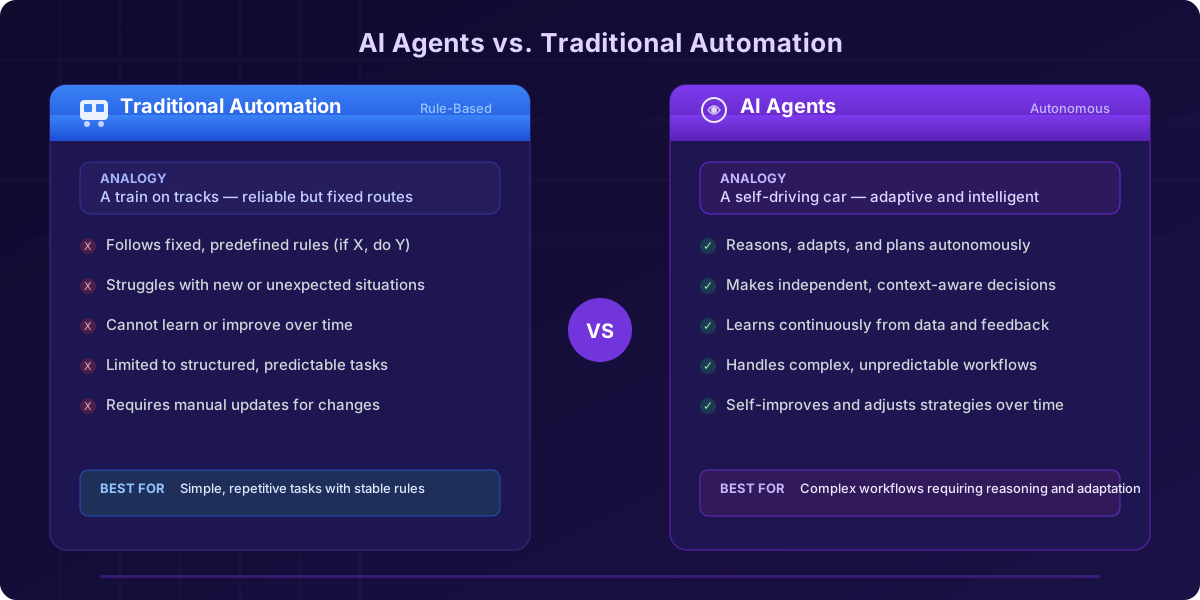
A fundamental difference exists between AI agents and traditional automation in how technology supports business operations. Traditional automation excels at predictable, repetitive tasks that rarely change because it follows fixed, predefined rules — if X happens, do Y. This approach works well for structured processes but struggles with new situations.
AI agents work with substantially more autonomy and flexibility. Instead of following rigid pathways, they:
- Reason and adapt — AI agents can break down complex problems, plan task sequences, and adjust strategies based on changing circumstances
- Make independent decisions — They weigh options and select optimal paths to complete tasks based on programmed or learned logic
- Learn continuously — Unlike static automation, AI agents get better over time through new data and feedback
- Understand context — They interpret nuances, intent, and dependencies in complex scenarios
The best way to understand this difference is through a simple comparison. Traditional automation works like a train on tracks — reliable and efficient but limited to predefined routes. An AI agent behaves more like a self-driving car that knows its destination but can choose its path, handle obstacles, and find shortcuts.
Business leaders should know that simple prompts are becoming outdated. Experts call it "the agent leap" — where AI coordinates complex, end-to-end workflows with increasing autonomy. This shift creates a vital opportunity for enterprises that want to speed up their value delivery in 2026.
Why businesses are adopting AI teammates
Companies now see AI agents as collaborative teammates that extend human capabilities rather than just tools. Procter & Gamble's research showed that teams using AI were three times more likely to generate top 10% ideas compared to teams without AI. These benefits drive business adoption:
- Productivity gains — AI agents helped P&G teams finish projects 16% faster for individuals and 13% faster for teams. They reduce employee workload, which leads to less burnout and more job satisfaction.
- Innovation boost — Teams with AI are better at breaking down silos and preventing specialists from dominating team processes, which brings more diverse insights.
- Skill accessibility — AI helps spread skills across organizations. Less experienced staff using AI performed as well as their experienced colleagues, showing how AI can expand problem-solving expertise throughout the workforce.
- Improved employee experience — Staff working with AI felt more enthusiastic and energetic about their projects. They also experienced less anxiety and frustration compared to those working without AI.
Companies are finding that AI agents add substantial value even without complete autonomy. The most successful implementations now focus on gathering and proving data, routing and prioritizing work, drafting recommendations, and coordinating tasks across systems within defined boundaries.
Workforce technology experts predict that by 2026, AI agents will work as integrated team members. We're moving beyond apps or digital assistants toward "Connected Intelligence" — where people, data, and digital workers (AI agents) work together side by side.
Deskferry offers a simplified path to deploy your first AI teammate. Unlike building custom solutions from scratch, Deskferry provides ready-to-deploy AI agents that integrate smoothly into existing workflows while maintaining appropriate guardrails and ethical boundaries.
Understanding the Core Components of AI Agents
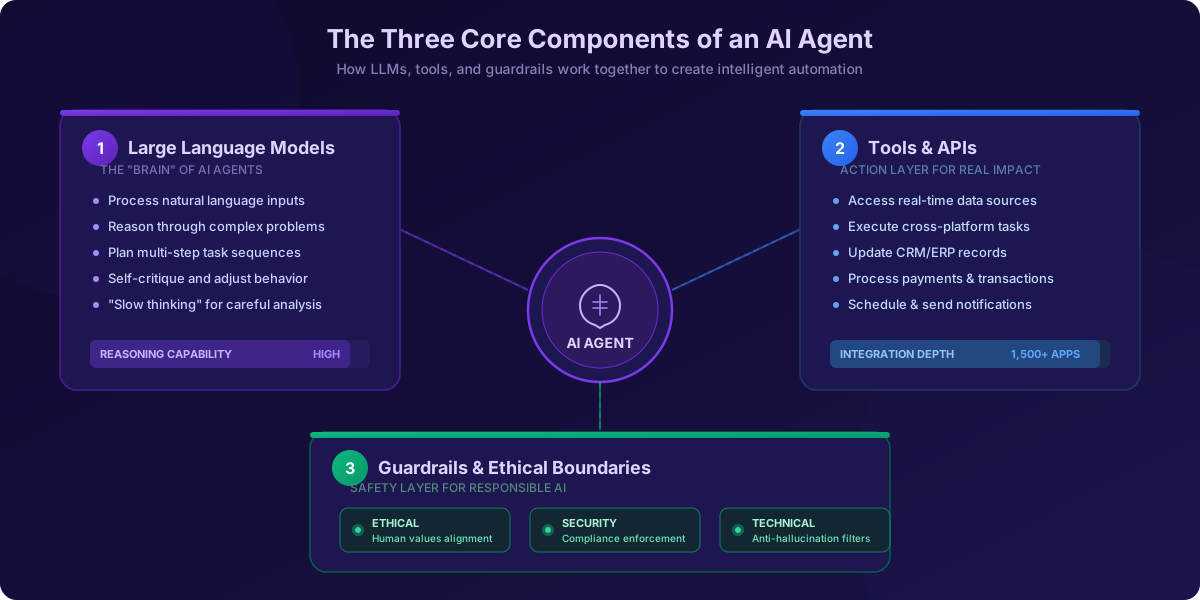
Three essential elements work together to create an effective AI agent: advanced language processing capabilities, specialized action tools, and carefully designed safety boundaries.
The role of large language models
Large language models (LLMs) act as the "brain" of AI agents. They provide the reasoning and decision-making capabilities that power operations. What started as simple text generators has grown into systems that understand complex instructions, plan multiple steps, and coordinate various components to finish tasks.
LLMs control an agent's architecture by processing natural language inputs and turning them into actionable information. They help agents understand user requests, create responses, and choose next steps. These models give agents the power to break down problems, create plans, and adjust their approach as situations change.
LLMs have made remarkable progress, moving from basic assistants to nearly independent agents that can:
- Orchestrate complex workflows
- Call on external tools when needed
- Self-critique and adjust behavior based on feedback
- Plan and execute multi-step processes without constant human oversight
Modern LLMs can now use what researchers call "slow thinking" — a careful, step-by-step problem-solving approach similar to human reasoning. AI productivity tools can now handle complex tasks that earlier automation could not touch.
Tools and APIs that power actions
While LLMs handle reasoning, tools and APIs let AI agents affect the real world. Without these components, even the smartest LLM would only generate text — unable to make changes in digital or physical spaces.
Tools are specific functions built for particular tasks: retrieving customer data, summarizing documents, or performing calculations. Developers can mix and match these modular tools to build flexible workflows that match business needs. APIs connect AI agents to external systems, allowing them to:
- Access real-time data from various sources and databases
- Execute tasks across different software platforms
- Process payments and manage transactions
- Update records in CRM or ERP systems
- Schedule appointments and send notifications
This continuous connectivity makes AI productivity tools far more valuable for businesses. They become team members that work across your digital ecosystem rather than isolated assistants. For example, an AI agent handling customer support can check your knowledge base, update customer records, and initiate follow-up actions — all without human help.
Function calling marks a key advance that lets LLMs know when to use specialized tools. Modern generative AI productivity tools can now tackle complex problems by naturally blending their built-in intelligence with external resources.
When choosing AI productivity tools, consider the range and depth of available tool connections. Platforms like Deskferry provide extensive integration options, making it much easier to deploy your first AI teammate with minimal technical work.
Guardrails and ethical boundaries
Strong safeguards must control AI agents' power to ensure safe and responsible operation. AI guardrails include policies, technical controls, and monitoring systems that guide how AI models create outputs and act in real-life scenarios.
These safeguards are essential parts of any effective AI agent architecture. Good guardrails protect against several key risks:
- Prompt injections and jailbreaks that try to manipulate AI behavior
- Exposure of sensitive data or personally identifiable information
- Generation of harmful, biased, or inappropriate content
- Hallucinations or factual inaccuracies in outputs
Guardrails work at multiple levels in an agent's workflow. They filter inputs before processing, watch reasoning in real-time, and verify outputs before delivery. This layered approach provides comprehensive protection while keeping agents functional.
A complete guardrail framework uses several types of protection:
- Ethical guardrails that keep responses in line with human values
- Security guardrails that enforce compliance with laws and regulations
- Technical guardrails that stop manipulation and prevent hallucinations
Well-designed guardrails do more than provide security — they help AI systems produce more accurate, relevant, and trustworthy results. These guardrails protect and enable organizations to grow their AI implementation responsibly while maintaining performance.
How AI Agents Improve Productivity Across Workflows
Businesses worldwide are experiencing a radical shift in work methods. A 2024 survey of over 10,000 desk workers revealed that 96% of executives recognize AI's importance in business operations. The results showed that 81% of AI tool users reported better productivity. Here's how AI teammates are improving results across business functions.
Use cases in customer support, marketing, and operations
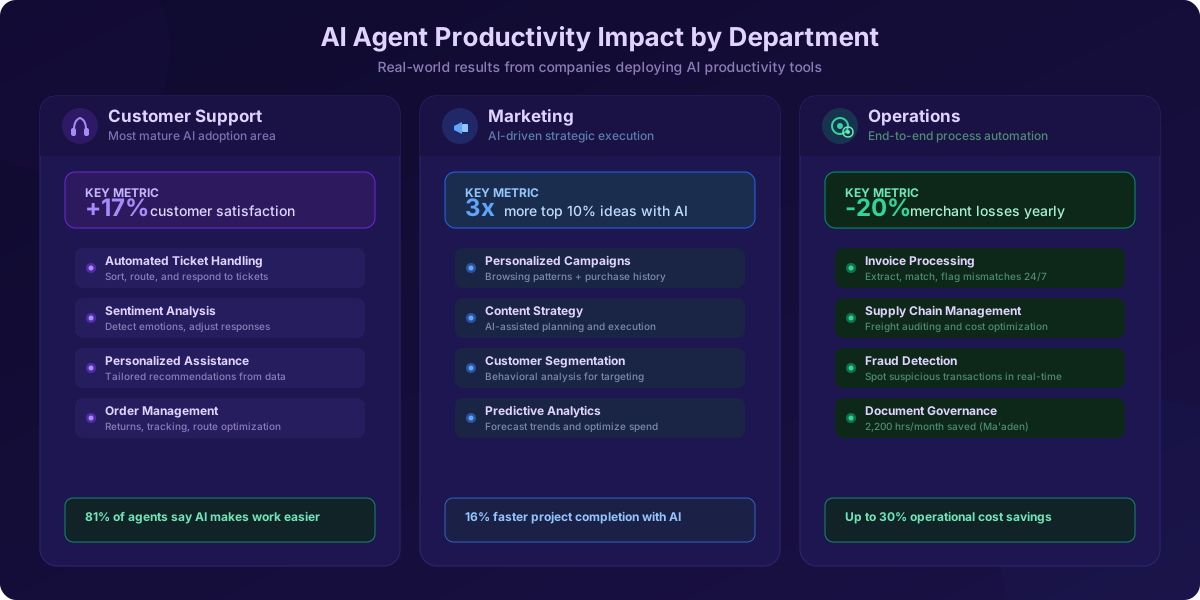
Customer support stands out as one of the most developed areas for AI agent adoption. Companies that use AI extensively report 17% higher customer satisfaction. These smart systems handle everything from basic questions to complex problems:
- Automated ticket handling — AI agents sort and direct support tickets, group customer requests, understand sentiment, and respond to common questions while escalating complex ones
- Order management — Agents review return policies, create return orders, track deliveries, and suggest the best delivery routes
- Personalized assistance — AI studies customer data to give tailored recommendations, improving customer experience and reducing support team size
- Sentiment analysis — Advanced AI spots customer emotions and adjusts responses, helping create better interactions and satisfaction
The shift from reactive to predictive service helps reduce customer losses. AI-powered virtual receptionists can talk to callers and keep things running smoothly during busy times, pulling information from business data to answer routine questions or sort queries.
Marketing operations have transformed with AI agents leading strategic planning and execution. AI-driven platforms use adaptive learning and context awareness to direct complex marketing workflows. AI agents study customer browsing patterns, purchase history, and behaviors to deliver personalized recommendations that boost sales and satisfaction.
Operational efficiency improvements are equally impressive. A global payments processor used advanced machine learning to predict merchant behavior — building digital twins of daily interactions and mapping proper interventions. This led to 20% fewer merchant losses yearly. A European telecommunications company reached market-leading satisfaction scores by stopping outbound campaigns to customers with open complaints.
The real opportunity lies not just in technology but in how people and organizations grow with it. Smart companies focus on creating new types of work instead of cutting jobs — moving from automating tasks to solving high-value problems. About 76% of IT leaders say focusing on complex challenges gives them a competitive edge.
Examples of AI productivity tools in action
AI productivity tools show their value across industries with measurable results:
- Ma'aden (Saudi Arabian mining company) gave employees AI agents to help with governance documents and authority policies. These agents, working through Microsoft Teams, saved 2,200 hours monthly.
- Pets at Home (UK's largest pet care company) created specialized agents to boost productivity and customer experiences. Their retail fraud team uses AI agents to spot suspicious transactions, discount abuse, and fake damage claims.
- U.S. AutoForce processes thousands of invoices daily, with half needing same-day delivery. They deployed AI agents in Excel to summarize spreadsheets, calculate queries, find information, and handle financial data more efficiently.
- Dow improved logistics with two supply chain agents. One checks freight invoices for problems to cut costs. Another processes PDF invoices from email and spots and routes mismatches 24/7.
Tools like Otter.ai transcribe and summarize meetings automatically, integrating with apps like Slack and Salesforce. Through platforms like Zapier, these meeting notes can power other processes — pulling out key tasks, creating project items, and updating CRM opportunities.
Starting your first AI agent is simple with platforms like Deskferry. The platform offers ready-to-use AI teammates that fit into current workflows. Your Deskferry agent can access company data in HubSpot, Notion, and Airtable — searching across all connected apps while data sources update automatically.
Choosing the Right AI Productivity Tools for Your Business
With so many AI productivity tools available today, businesses need to think carefully about which ones work best. Finding the right solutions to boost your workflow without wasting resources requires careful assessment.
Free vs. paid AI tools
Your specific business needs and expected ROI should guide your choice between free and paid AI tools. Right now, 78% of enterprises struggle to integrate AI with their existing tech stacks — making it vital to pick tools that work naturally with your current systems.
Free AI productivity tools give businesses a good starting point:
- Initial testing and proof of concepts
- Basic, occasional tasks
- Teaching teams about AI capabilities
- Small projects with basic requirements
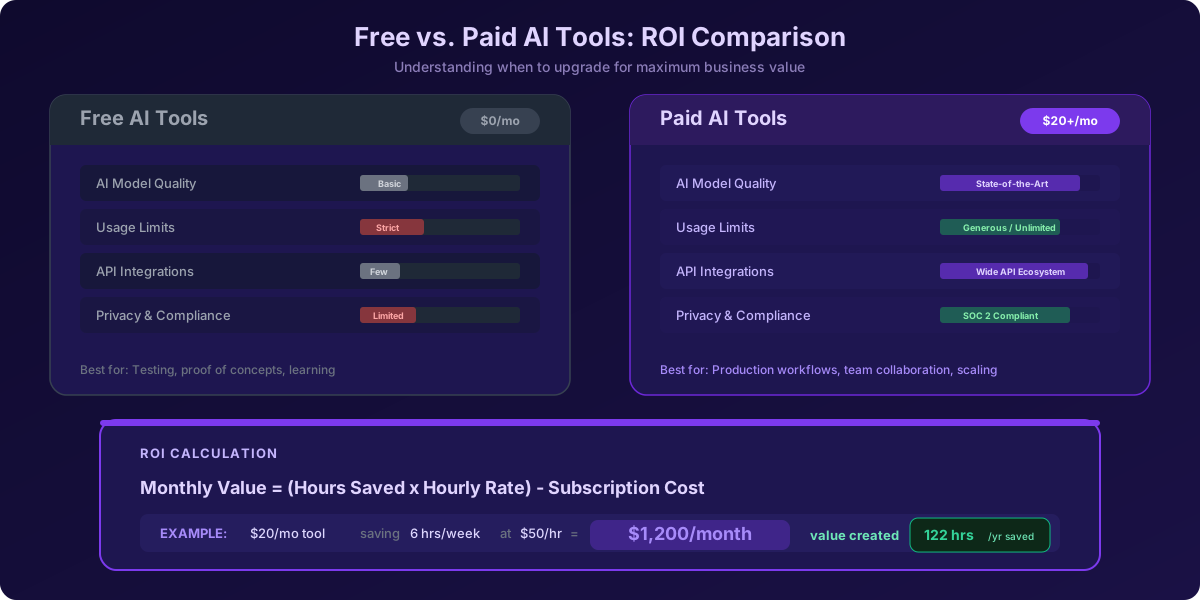
But these tools come with clear limitations. Free versions usually run on older AI models, have strict usage caps, provide basic support, and lack important integrations. These restrictions can hold back productivity as your needs grow.
Paid tools offer better value through:
- State-of-the-art AI models
- Strong privacy controls and compliance features
- Natural team collaboration features
- Wide API integrations for process automation
- Faster processing during busy periods
This simple formula helps you decide if upgrading makes financial sense:
Monthly value = (Hours saved per month × Hourly rate) - Monthly subscription cost
For example, a $20/month tool that saves a professional 6 hours weekly at $50/hour creates about $1,200 monthly in value. Companies using AI business automation tools report their employees save up to 122 hours yearly on basic administrative tasks alone.
Evaluating generative AI productivity tools
When assessing generative AI productivity tools, look at these important factors:
- Context-specific evaluation — AI tools work differently across industries, departments, and tasks. Assess how a tool works in your specific business setting rather than relying on general reviews.
- Control group comparison — Compare results against teams not using AI to see if improvements come directly from the AI system.
- User expertise considerations — AI productivity tools' effectiveness changes based on user skill levels. Tools that work well with users of all skill levels usually provide more reliable value.
- Adoption metrics — Success largely depends on how fast your team can use new AI tools effectively. Track onboarding time and integration with current workflows.
- Maintainability assessment — Check how easily you can update or manage AI-generated outputs over time. Some AI solutions create results that need less human oversight.
Security, user experience, and scalability should also shape your decision. Look for tools with SOC 2 compliance and data residency options if you handle sensitive information.
Top platforms to consider in 2026
Market trends suggest these AI productivity platforms deserve your attention in 2026:
- Deskferry — Provides ready-to-use AI teammates that fit smoothly into existing workflows. Deskferry offers an easy way to deploy your first AI teammate without needing special technical skills.
- Zapier AI — Acts as an AI layer connecting over 8,000 apps, letting tools and AI work together across your tech stack.
- ChatGPT Enterprise — A flexible business tool that handles writing, data analysis, strategy building, and customer queries. Organizations using it save about 2.8 hours per employee weekly.
- Notion AI — Stands out in team collaboration and content creation, helping organizations centralize document creation while using AI to speed up workflows.
- ElevenLabs — Turns written content into natural, studio-quality audio without voice artists, giving brands a consistent voice across content channels.
- HubSpot's AI suite — Goes beyond organizing contacts by offering actionable insights for customer engagement.
- Fireflies — Fixes meeting documentation issues by recording, transcribing, highlighting key points, and sharing action items automatically.
Your choice should balance current productivity needs with long-term goals. The best implementations start with specific, high-impact use cases before expanding to other business functions.
How to Hire or Deploy Your First AI Agent with Deskferry
The modern digital world demands AI implementation without hiring expensive developers or building complex systems from scratch. Smart businesses deploy ready-made AI solutions that fit smoothly into their existing workflows. Deskferry offers a clear path for companies ready to hire their first AI teammate.
What is Deskferry and how it works
Deskferry is a comprehensive no-code platform built to create intelligent AI agents without writing code. The platform empowers businesses to build automation that thinks, learns, and works independently to transform workflows. Unlike standard automation tools, Deskferry works as a digital teammate rather than a static tool.
The platform features an intuitive yet powerful interface. Teams can build custom AI solutions quickly or adapt pre-built templates to match their needs. The AI creates custom agents instantly when users describe their requirements in plain English. This approach opens AI development to anyone with domain expertise — whatever their technical skills.
Deskferry connects to over 1,000 apps behind the scenes, including email, Slack, Google Sheets, CRM systems, and project management tools. Your AI agents can pull data from one place, make decisions based on your rules, and take action elsewhere — all automatically.
Steps to deploy your first AI teammate
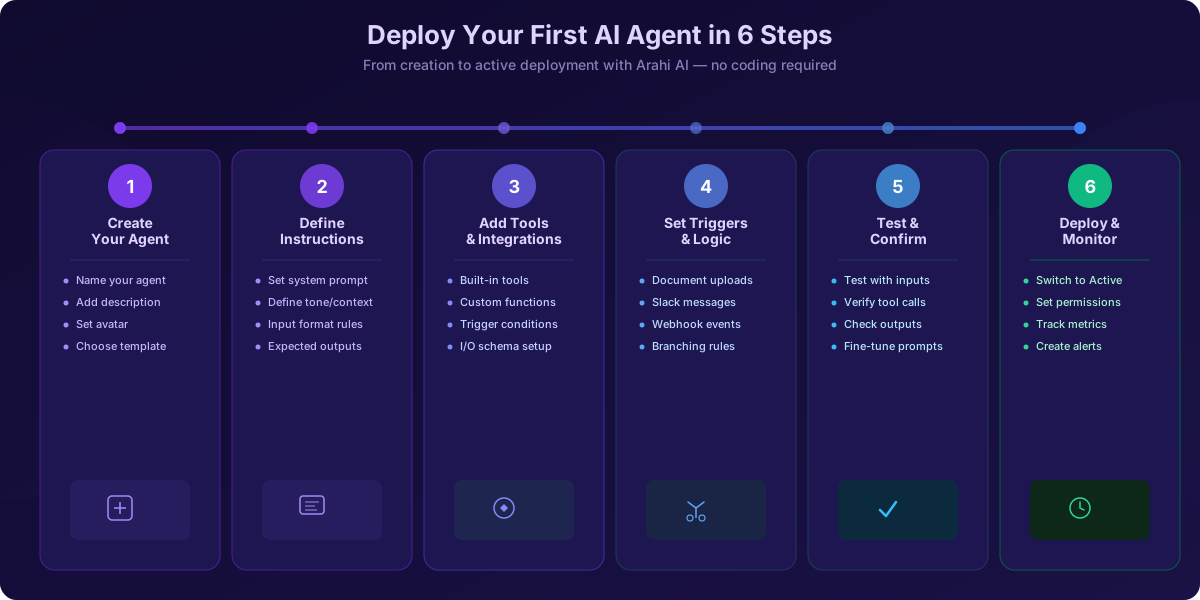
Your first AI agent deployment on Deskferry follows these simple steps:
-
Create your agent — Go to the Agents section and click "Create New Agent." Add a name, description, and an optional avatar for your agent's identity. Choose between a template, Agent Invent, or start fresh.
-
Define prompt and instructions — Design the prompt that drives your agent's behavior. Set system instructions for tone, context, user input format, and expected output. Example: "You are InvoiceBot — you receive invoice PDFs, extract line items, match to PO, flag mismatches, and update the database."
-
Add tools and integrations — Select "+Add Tool" under "Tools/Connected Resources" to pick from built-in tools or create custom ones. Each tool needs a name, description, trigger conditions, and input/output schema.
-
Set triggers and workflow logic — Choose what activates your agent: uploaded documents, Slack messages, webhook events, or scheduled jobs. Set up branching logic (e.g., if amount exceeds $10,000, escalate; otherwise, auto-approve).
-
Test and confirm — Use test inputs to check your agent's behavior. Make sure tools work correctly and outputs make sense. Fine-tune prompts, tool settings, or logic based on results.
-
Deploy and monitor — Switch your agent from "Draft" to "Active" once testing succeeds. Set access permissions, track key metrics, create alerts for anomalies, and check performance regularly.
Customizing tasks and workflows
Deskferry's versatility shines through its customization features:
- Connect to your data sources — Organize and upload documents, files, and data sources for agents to access contextual and accurate responses. This ensures your AI teammate always uses current information.
- Build AI tools for automation — Design specialized tools to automate specific workflows that work across your AI agents. This modular design creates adaptable solutions that grow with your business.
- Integrate with existing systems — Link your current systems to the platform. AI agents start working when triggered from any of your apps. Developers can use the platform's API to deploy and trigger AI agents with minimal code.
- Create specialized agents — Build AI teammates for specific business functions, from customer support and sales automation to data analysis and content creation.
This approach helps businesses implement powerful AI productivity tools that work round the clock. Users save over 100 hours monthly with these deployments, making Deskferry one of the best AI productivity tools for organizations wanting quick gains without technical complexity.
Best Practices for Integrating AI Agents into Your Team
Your organization's success with AI largely depends on your team's ability to work with digital colleagues. Studies reveal that 99.5% of organizations have taken steps to boost their employees' AI literacy. This statistic highlights how crucial proper integration has become.
Training your team to work with AI
Teams must see AI as a tool that improves their capabilities rather than replaces them. This mindset helps them develop "delegation discipline" — a framework that sets clear AI task boundaries and establishes escalation protocols for human intervention.
These training approaches can help your team:
- Role-based learning — Create specialized training programs for different roles: simple users who check results, supervisors who approve actions, and creators who set up agents.
- Scenario practice — Design real-life situations that match daily workflows where teams work with AI assistants.
- Skill development — Focus on data literacy, critical thinking, and digital fluency as AI adoption makes these skills more valuable.
Change management plays a vital role too. Your team needs to understand why you're adding AI productivity tools and how they'll improve human capabilities rather than replace jobs. This strategy addresses concerns effectively — 81% of customer service agents already say AI makes their work easier.
Starting with Deskferry as your first AI teammate requires short, focused training sessions and internal guides to help adoption. You can then build a data flywheel where AI tools get better through user interactions and feedback. This approach ensures your AI productivity tools stay relevant and work well over time.
Successful AI integration improves human judgment instead of replacing it. Companies that invest in proper training will expand their AI implementation more safely and effectively.
Conclusion
The future of work isn't about replacing humans with AI — it's about creating powerful human-AI partnerships that amplify productivity and unlock new possibilities for growth.
AI agents have proven their worth across industries. From mining companies saving 2,200 hours monthly to retailers cutting hiring time by 67%, the evidence is clear: businesses that embrace AI productivity tools gain a significant competitive edge.
The path forward doesn't require deep technical expertise or massive budgets. Platforms like Deskferry make it possible to deploy your first AI teammate in hours, not months. Start with a specific, high-impact use case. Train your team to work alongside AI rather than fear it. Measure results with clear ROI metrics.
Companies will move from purely human-centric operations to human-coordinated teams of specialized AI agents as we progress through 2026. Those who start now — even with a single agent handling one workflow — will be positioned to scale when the opportunity demands it.
Your first AI hire is waiting. The question isn't whether to bring AI into your team, but how quickly you can start reaping the benefits.
Get started with Deskferry today and deploy your first AI teammate in minutes.
Frequently asked questions
- What are AI agents and how do they differ from traditional automation?
- AI agents are autonomous systems that can perceive their environment, process information, make decisions, and execute actions. Unlike traditional automation that follows fixed rules, AI agents can reason, adapt, make independent decisions, and learn continuously. They're more flexible and can handle complex, unpredictable tasks.
- How can AI agents improve productivity in businesses?
- AI agents can enhance productivity by automating routine tasks, providing personalized assistance, analyzing data for insights, and orchestrating complex workflows. They can work across various departments like customer support, marketing, and operations, saving time and improving efficiency. Many businesses report significant time savings and improved customer satisfaction with AI implementation.
- What should I consider when choosing AI productivity tools for my business?
- When selecting AI tools, consider factors such as integration capabilities with your existing tech stack, security features, scalability, user experience, and return on investment. Evaluate how the tool performs in your specific business context and compare its performance against non-AI methods. Also, assess the tool's adoption rate and how easily your team can learn to use it effectively.
- How can I deploy my first AI agent using Deskferry?
- To deploy an AI agent with Deskferry, start by creating a new agent in the platform. Define its prompt and instructions, add necessary tools and integrations, set triggers and workflow logic, and thoroughly test the agent. Once satisfied with its performance, deploy it and monitor its operations. Deskferry offers a no-code interface, making it accessible even for those without technical expertise.
- What are some best practices for integrating AI agents into my team?
- To successfully integrate AI agents, focus on training your team to work effectively with AI. This includes developing a mindset of AI as augmentation rather than replacement, providing role-based learning, and practicing real-world scenarios. Clear communication about the purpose of AI implementation is crucial. Additionally, invest in developing skills like data literacy and critical thinking, which become more important with AI adoption.